Showing posts with label google. Show all posts

Thursday, 26 April 2012

AdWords 'PPC' Extensions

AdWords ‘PPC’ Extensions

Next time you’re analysing your AdWords PPC campaign, take a look at the AdWord Extensions.

These Extensions include:

  • Location Extensions
  • Call Extensions
  • Sitelinks Extensions
  • Product Extensions
  • Social Extensions

You may be a little daunted at first in implementing them on your PPC campaigns, but from the research I’ve been carrying out and seeing the results of this research it’s definitely something you should be looking at using.

Tuesday, 13 March 2012

Crawl Errors in Foreign Language - Webmaster Tools

Interesting view in Google Webmaster Tools this morning, 'crawl errors' are reading in different languages, first German:


Followed with French:

Thursday, 13 October 2011

Category for Google Keyword Tool

From apparel to the most unique category, that's what Google's Keyword Tool now offers:


How beneficial is this for the SEO and PPC aficionado, well it basically cuts out a lot of the mix up and the huge list of irrelevant kewords that the tool used to generate.

And just in case you never noticed before, and weren't adding 'sneakers' to your USA PPC for the UK word 'trainers' or were simply mixing up USA & UK keywords, now the tool also clearly depicts location.

Good work Google

Friday, 26 August 2011

Blogspot to Custom Domain with LCN Registrar

You want to transfer your Blogspot Blog, that's Google's free Blogging platform, to your own custom domain, and your website is hosted with the LCN registrar, that is:

http://BLOGNAME.blogspot.com
to
http://blog.websitedomainname.com

It's all a lot easier than I initially found.

I won't go into the ins-and-outs of why you want to make the change from Blogspot to custom domain because if you've got this far you've made the decision that you want to make the change.

Firstly I don't need to re-run through the whole procedure because here is a cracking page which explains How do I use a custom domain name for my blog?

Once you've got past these two stages:

Thursday, 30 June 2011

Webmaster Tools +1 Metrics

A nice new addition to Google's Webmaster Tools this morning is Google's +1 Metrics. These include a breakdown of:
  • Search Impact
  • Activity
  • Audience
I believe for most website owners these pages will stay empty for quite some time. That isn't saying that the +1 won't be used, just that for a lot of smaller websites it won't be used.

It will be interesting to see the integration of +1 into the web stats, especially seeing that Google is now going to integrate the +1 into AdWords PPC ads, you can read more on that here Google +1 for PPC.

I do have a slight gripe though, and that is Google have gone to all this trouble to add these new pages to Webmaster Tools, but still haven't done anything regarding the 'benchmark' reports, which I know a lot of SEOs sorely miss.

Thursday, 25 November 2010

XML Sitemap Submission for Google, Bing, Yahoo & Ask

When you want to ping your newly created XML sitemap to the various search engines, you don't always want to log-in to Google, Yahoo, Bing or Ask to do so, you may just want to let them know of your updated sitemap.xml at your easiest convenience.

Therefore, here are 4 simple URL commands that will do the job for you, copy and paste the URLs into your 'notepad' or whatever editing device you use and change the 'EXAMPLE' for your own website's sitemap address, not forgetting to alter the '.com.' if you've a 'co.uk' site &c.

BING
http://rpc.weblogs.com/pingSiteForm?name=InfraBlog&url=http://www.EXAMPLE.com/sitemap.xml

ASK
http://submissions.ask.com/ping?sitemap=http://www.EXAMPLE.com/sitemap.xml

YAHOO!
http://search.yahooapis.com/SiteExplorerService/V1/updateNotification?appid=YahooDemo&url=http://www.EXAMPLE.com/sitemap.xml

GOOGLE
http://www.google.com/webmasters/tools/ping?sitemap=http://www.EXAMPLE.com/sitemap.xml

Keeping a copy of the saved sheet means, every time you update your website's sitemap you only have to revisit and copy and paste 4 times or if you're really brave paste it into a Word document and launch them from there - it works!

Wednesday, 8 September 2010

I Can't Create Similar AdWords Reports

I signed into AdWords to use the create similar reports for my clients PPC campaigns, now these usually take a couple of minutes to generate - not last week, thanks to more tinkering from Google.

I'm not against change, and I know that anything on the web will be continually updated, but hey, Google have my email and they're happy enough to send me other useful AdWords stuff, so why couldn't they have forewarned me of this change?

Instead, my campaign and account level reports took-up unnecessary time as I trawled the web and read nonsensical forums, before I was totally clear on where to create similar reports. Only they won't be similar, because now, every month, it seems I'm going to have to reproduce them from scratch.

Yes the AdWords link to this page:

Where Can I Find My Reports

Does help, but it's the inconvenience of changing something that worked really well, for something you've got to dig through AdWords for each month to generate.

But on a better note for Google - have you seen the new Bing Webmaster Tools.

It's not that Google can do no wrong, it's the stupidity of their competition that let's them do almost what they want, which is awful for us users because they can make annoying changes to AdWords reports and the like and we basically have to tow -the-line because there is no better alternative.

Wednesday, 23 June 2010

Link-building & Websites

Google published on 21st June 2010:

Quality links to your site

So who has the time to link to a website, and why would you want to link to a website?

I'm pretty altruistic when it comes to linking and I don't slot in a no-follow attribute either, but, the site I'm linking to has to have quality content - so far this is exactly what Google say in their article about quality content, but I'm not sure if the nature of the web is altruistic on the whole. Yes between friends sharing stuff on Facebook and Twitter, but what if you've a pretty mundane business, it's going to be mighty difficult to get links from other sites no matter how much humour you try to conjure up on your site.

Every day as a SEO/ SEM you get requests for reciprocal links, but we know they're rubbish. Google tells us some Directories are good others bad - yes you've got to be a little naive to believe that by spending £20 on 350 links you'll suddenly reach the dizzy heights of a #1 spot in Google search, but carrying out the link building manually - is it any better, probably not as the Google bot never goes past the 1st page of most directory categories.

So is it also a little of naive Google to believe we live in this ideal world where people will literally rate sites (by adding a link), positively if they've had a good experience or with 'page speed' coming in, won't they just realise if a visitor hasn't the patience to wait 10 seconds (Website Response Times - Jacob Nielsen, there goes my altruism again) surely they haven't the time to (in most cases) go back to their site and add a link!

Tuesday, 22 June 2010

Total Visits via 'How Many' Keywords

The regular metric for monitoring a website's indexability progress on the web is:

site:www.yourwebsite.com

This tells you how many pages of your website Google has indexed, which is a pretty useful figure, because if your site has 500 pages and Google has only indexed 10 - well, you know you need to do something.

But that is what the figure is; it's more of a check on your site's on-line status than how well your site is performing.

So how can we tell how well a site is performing - naturally before sales figures and the like, this is performance via pure web metrics?

Well, by knowing how many different keywords are used to access your site through 'search', is a clear indicator of how accessible your site is to the search engines, meaning, how good the semantics within your content is to a search engine spider. If your content is rich, that is, it makes sense and isn't only jam packed full of keywords, it will be easily indexed and everything written will have a chance of being accessible to a potential customer when carrying out a search in their chosen search engine.

So how's it measured?

Easy.

Google Analytics makes it so.

When in Analytics go to: 'Traffic Sources', then drill down through 'Search Engines', then 'Google' (Bing and Yahoo! are still miles behind and hardly worth monitoring), the metric for 'keywords' is the default, see Below:


Then it's crystal clear; columns with the keywords listed in order of usage (you naturally get an overall figure at the top & bottom of the page), with the usage for each individual keyword in the first column, then the usual Analytic metrics.

By monitoring this data on a monthly basis you are going to be offering your clients a much more worthwhile piece of data than the site index could ever achieve, and if it increases incrementally month on month, then you're going in the right direction and your clients should be pleased.

Then all you have to do is encourage these new found visitors to purchase, sign-up or whatever your website's goal is...

Thursday, 15 April 2010

Top Search Queries - Google Webmaster


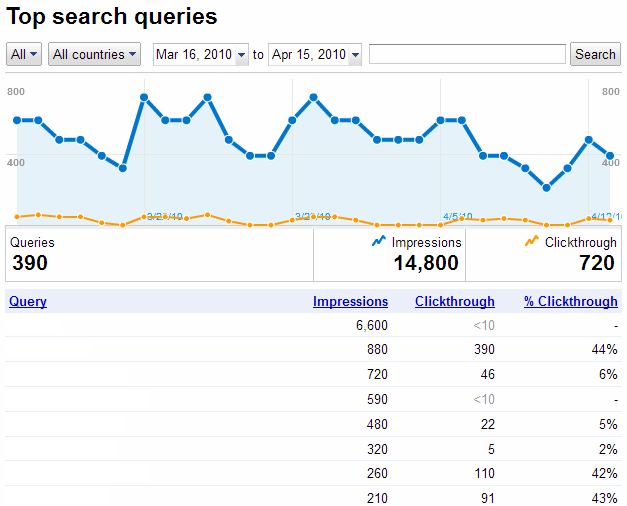
The new look 'top search queries' in Google's Webmaster Tools seems fresh off the press and it's a treat.

It not only gives you the previous information of how many times your site generated impressions and clicks in Google SERPs, it also gives you a good dissection of these details.

Before when you thought, well my site has generated 6,600 impressions (please see above), you'd have believed at least a few of these would have generated a click - but no. For some keywords it's pretty painful, but for others an impressive 44% (also see above).

That's naturally not all, you now get to see where a particular keyword is ranking in SERPs, and this is the surprising bit, because in the previous layout you got the information that someone had clicked through to your site and you wondered how, because you weren't on the 1st page of Google; now you find out that people do actually find you on the 3rd page of Google and click through to your site.

The graph is also a boon, even if I originally thought I'd mistakenly logged in to Analytics.

The countries option and date option will help when you want to test any campaigns or try out some new keywords on the site. Once more the job of SEO is becoming more transparent, nothing to hide behind; that is of course of you show your clients the report!

Friday, 5 March 2010

Google Personal Search

Don't get me wrong I like Google.

I like Google a lot more than I like Bing and the now defunct Yahoo!

But personal search, well it seems to be going a little too far...

I carry out searches every day for different clients, I need to, to check how their selected bench-marked keywords are performing in SERPs. But every time I do this now I need to remember to 'disable customizations based on search history' - why should I have to.


Why can't I opt out.

It isn't just the forgetting to disable - I can't it's implanted.

It's when I carry out a search of my own before dinner and visit a few sites, go and eat, then carry out the same search query again after dinner, hey presto everything I visited before dinner is now at the top of the page. This is frustrating, because now I don't which site was genuinely the best - or should I say performed best in Google's SERP.

Maybe some users like this, well if that's the case let there be a big on/off button.

It seems to me that the web is dumming down, aiming for the lowest common denominator. Our web pages are becoming more cluttered with advertising, you need to scroll down half a yard with most blogs now to get to content - you can't see the wood for the trees.

Is this really what we imagined a few years ago, that the web would become just one great big battle for which api, web service, website &c will get the most advertising revenue.

It seems so, and its really putting me off.

Like I said I like Google, but localising & personalising my search, well I might just have to start looking elsewhere.

Tuesday, 6 February 2007

Meta Data Description

Google and Yahoo! SERPs both used my page’s Meta data description; this is fantastic, this is what I hoped for when I spent precious time writing the Meta description.

Unfortunately not all search engines are so kind, MSN and ASK didn’t use my Meta data description, no they used a random selection of text from the page. Well to be honest to them when I say in random they did actually use: firstly the 'h1' title of the page, followed by the text from an anchor link (with my initial search term in it), then the search term again highlighted in ‘bold’; you may think this is all well and good, but it’s not - yes it brings up all the search terms searched for, but in a very disjointed way, and the problem with this is that to your potential customer your page link looks like it was written by someone illiterate (unfortunately this loses trust).

When the Meta description is written correctly giving the potential customer a good idea of what is at the other end of the link – yes let them know and if there’s a cost involved let them know that too – you give yourself a head start; why do you think that Adwords on the right hand side of the screen perform so poorly – there’s hardly any room for a description.

But it’s not all that simple, there has to be more than just an initial benefit for clicking your link, there has to be trust; I like it when I see the company title in the 'title' tag, I also like to see a good clear URL (uniform resource locator); I mean how many times have you searched and found the top five or six positions in SERPs have all got dodgy looking URLs, shady titles, or even the whole thing in bold or capitals – I mean where’s that coming from, it’s like opening your door to a salesman who thinks it’s cool to have dressed up like Leatherface.

So I think we’re getting there, that is Google and Yahoo!, MSN and ASK are just not playing ball at the minute. Where was I, oh yes benefits, a benefit is something essential to get someone to click through to your Website – this is the what’s in it for me situation; we covered trust, if you didn’t quite get trust here it is again – keep your page title, and URL looking sane and of course clean and tidy – it’s bad enough what MSN and ASK do before you really spoil it for yourself. Next it’s the trigger, this is what makes someone think – yes this is for me, I will find what I’m after one click from here, so make them pull that trigger.

So you see why I was so pleased when Google and Yahoo! decided to use my Meta data, they used my advert – and a reasonably lengthy one at 122 characters – an advert which says what I want my customers to read, not a keyword packed jumbled up sentence which will be of no consequence because this potential customer has now gone down a position and clicked on another link.
So no matter how good your SEO (search engine optimization) is it all means nothing if you don’t follow it up with a good Meta description and a clean and tidy link – so remember benefit, trust, trigger and stick with Google & Yahoo!