Imagine you’re a search engine spider and you're crawling through another webpage: your first stop is the website’s logo, then the menu and if it’s a behemoth of a website then there's going to be a pretty big menu to trawl through, then if you’re unlucky you’ll have a carousel of images - and you’ve still not reached the most important unique information yet!
Showing posts with label search engine optimisation. Show all posts
Showing posts with label search engine optimisation. Show all posts
Friday, 11 May 2012


Friday, 25 March 2011
Keywords - What are They?
What is Keyword Research
Keyword research is the process you use to find the keywords and key-phrases that are relevant to your website and will enable it to rank well in the search engines. Meaning, these keywords or key-phrases are the ones that your potential customers will use to type into the search engines to find products and services that you supply.
Why is Keyword Research so Important
Irrelevant to whether you’re a large company with a huge website or a small company with a niche website, without targeting the correct keywords and key-phrases you won’t get any visitors, or at least you won’t get many! This isn’t only relevant to natural ‘organic’ search; it’s also relevant to paid ‘PPC’ marketing. So if you’re not using carefully crafted keywords and key-phrases in you’re: Titles, Meta attributes headings and body – you’re likely to be short of visitors from the search engines.
Website Consultancy: ensuring your website operates at its optimum with website management, usability assessment, optimisation and paid advertising.
Thursday, 15 April 2010
Top Search Queries - Google Webmaster
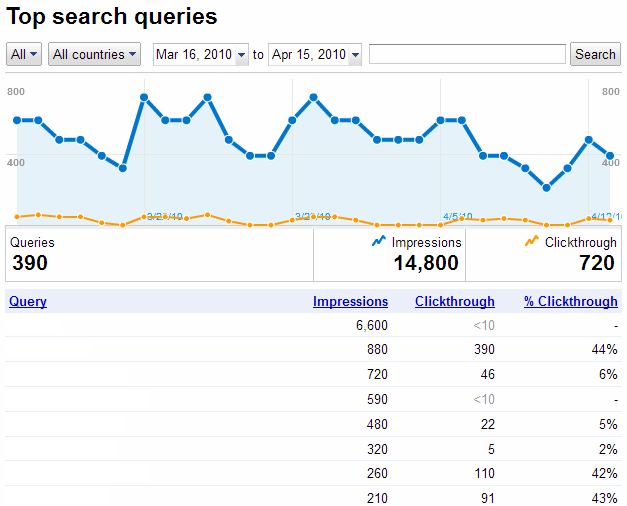
The new look 'top search queries' in Google's Webmaster Tools seems fresh off the press and it's a treat.
It not only gives you the previous information of how many times your site generated impressions and clicks in Google SERPs, it also gives you a good dissection of these details.
Before when you thought, well my site has generated 6,600 impressions (please see above), you'd have believed at least a few of these would have generated a click - but no. For some keywords it's pretty painful, but for others an impressive 44% (also see above).
That's naturally not all, you now get to see where a particular keyword is ranking in SERPs, and this is the surprising bit, because in the previous layout you got the information that someone had clicked through to your site and you wondered how, because you weren't on the 1st page of Google; now you find out that people do actually find you on the 3rd page of Google and click through to your site.
The graph is also a boon, even if I originally thought I'd mistakenly logged in to Analytics.
The countries option and date option will help when you want to test any campaigns or try out some new keywords on the site. Once more the job of SEO is becoming more transparent, nothing to hide behind; that is of course of you show your clients the report!
Friday, 7 August 2009
Excessive JavaScript and Computer Meltdown
Home users are the people that really suffer when your website has an excessive amount of JavaScript include files, this is when it is internally called: i.e. client side loading.
Is there a solution to halting this meltdown of someone’s computer as it staggeringly attempts to take in all those lovely new media APIs.
Yes, of course there is, but alas there aren’t many designers either willing to or able to implement the changes.
So what do you need to do? Simply convert as many of the include JavaScript files to externally called JavaScript files, this will solve a lot of the meltdown, but it definitely won’t solve all of it.
Next step, you need to condense these externally called JavaScript files into as few amounts of fetches as possible. This is the tricky bit, but below I will offer some code you can experiment with.
Basically what I say to explain this in simple terms is: imagine you’re out for a walk with your dog and you’ve a great big bag of sticks, if you make the dog collect every stick individually, after you’ve thrown them, well, it could take some while and the dog’s going to get mighty tired, but, if you were to put so many sticks into, say two or three bags and throw them for the dog, well, the bags may individually take a little longer to fetch, but I can assure you, no way near as long as gathering them all when thrown individually.
So wrap up your 21 files of JavaScript into a few neat packages and improve your potential customers’ experience of your website, and who knows you may even get a few more sales or sign-ups.
Okay here’s the test code, but do remember it is test code, so use with care and tell me how you get on.
And credit where credit is due, this isn’t my code it's from a clever chap called Niels Leenheer, he calls it the ‘CSS and Javascript Combinator 0.5’ and it was copyrighted in 2006.
CODE:
$cache = true;
$cachedir = dirname(__FILE__) . '/cache';
$cssdir = dirname(__FILE__) . '/css';
$jsdir = dirname(__FILE__) . '/javascript';
// Determine the directory and type we should use
switch ($_GET['type']) {
case 'css':
$base = realpath($cssdir);
break;
case 'javascript':
$base = realpath($jsdir);
break;
default:
header ("HTTP/1.0 503 Not Implemented");
exit;
};
$type = $_GET['type'];
$elements = explode(',', $_GET['files']);
// Determine last modification date of the files
$lastmodified = 0;
while (list(,$element) = each($elements)) {
$path = realpath($base . '/' . $element);
if (($type == 'javascript' && substr($path, -3) != '.js') ||
($type == 'css' && substr($path, -4) != '.css')) {
header ("HTTP/1.0 403 Forbidden");
exit;
}
if (substr($path, 0, strlen($base)) != $base || !file_exists($path)) {
header ("HTTP/1.0 404 Not Found");
exit;
}
$lastmodified = max($lastmodified, filemtime($path));
}
// Send Etag hash
$hash = $lastmodified . '-' . md5($_GET['files']);
header ("Etag: \"" . $hash . "\"");
if (isset($_SERVER['HTTP_IF_NONE_MATCH']) &&
stripslashes($_SERVER['HTTP_IF_NONE_MATCH']) == '"' . $hash . '"')
{
// Return visit and no modifications, so do not send anything
header ("HTTP/1.0 304 Not Modified");
header ('Content-Length: 0');
}
else
{
// First time visit or files were modified
if ($cache)
{
// Determine supported compression method
$gzip = strstr($_SERVER['HTTP_ACCEPT_ENCODING'], 'gzip');
$deflate = strstr($_SERVER['HTTP_ACCEPT_ENCODING'], 'deflate');
// Determine used compression method
$encoding = $gzip ? 'gzip' : ($deflate ? 'deflate' : 'none');
// Check for buggy versions of Internet Explorer
if (!strstr($_SERVER['HTTP_USER_AGENT'], 'Opera') &&
preg_match('/^Mozilla\/4\.0 \(compatible; MSIE ([0-9]\.[0-9])/i', $_SERVER['HTTP_USER_AGENT'], $matches)) {
$version = floatval($matches[1]);
if ($version < 6)
$encoding = 'none';
if ($version == 6 && !strstr($_SERVER['HTTP_USER_AGENT'], 'EV1'))
$encoding = 'none';
}
// Try the cache first to see if the combined files were already generated
$cachefile = 'cache-' . $hash . '.' . $type . ($encoding != 'none' ? '.' . $encoding : '');
if (file_exists($cachedir . '/' . $cachefile)) {
if ($fp = fopen($cachedir . '/' . $cachefile, 'rb')) {
if ($encoding != 'none') {
header ("Content-Encoding: " . $encoding);
}
header ("Content-Type: text/" . $type);
header ("Content-Length: " . filesize($cachedir . '/' . $cachefile));
fpassthru($fp);
fclose($fp);
exit;
}
}
}
// Get contents of the files
$contents = '';
reset($elements);
while (list(,$element) = each($elements)) {
$path = realpath($base . '/' . $element);
$contents .= "\n\n" . file_get_contents($path);
}
// Send Content-Type
header ("Content-Type: text/" . $type);
if (isset($encoding) && $encoding != 'none')
{
// Send compressed contents
$contents = gzencode($contents, 9, $gzip ? FORCE_GZIP : FORCE_DEFLATE);
header ("Content-Encoding: " . $encoding);
header ('Content-Length: ' . strlen($contents));
echo $contents;
}
else
{
// Send regular contents
header ('Content-Length: ' . strlen($contents));
echo $contents;
}
// Store cache
if ($cache) {
if ($fp = fopen($cachedir . '/' . $cachefile, 'wb')) {
fwrite($fp, $contents);
fclose($fp);
}
}
}
There you go then, all done.
Monday, 23 February 2009
There's more to Optimisation than Just SEO
What surprises me with the relentless pursuit of SEO is that everyone seems to believe it is the be all and end all of a website's presence, it is very important, but it is definitely not all there is to running a successful website.
The whole gamut of skills required to run a website are acquired through years of learning and then putting that learning into practice. There is of course the basic SEO that is in books, or handy tips on-line including many versions of top ten essential SEO tips. These are all very well and good, but, don't answer all the nitty-gritty day to day questions: reliable hosting, quality of content on the page, quality of products to sell or to sign-up for, ease of navigation &c.
An SEO agency will often write a long-winded optimisation report, which the client, on the whole, won’t understand, this report will be in minutia detail about the technical optimising of the website, this is great of course for those with rather large pockets of money. If there is the cash to spend on completely rebuilding a site from the bottom up, there is a good chance you will reach the first page of Google, because naturally the agency will have sold you a linking package as well.
The problem arises when your site does reach the pinnacle of Google's search, if it still possesses all that terrible original content, then it will just develop a bad case of bounce rate, Google will notice this and then slowly but surely allow your lovely, newly developed site to slide back down the rankings, this is partly due to most agencies not having the time of day for usability, if you read Jacob Nielsen you will know all about the importance of usability.
What am I saying; well basically websites are not compartmentalised, for SEO to work, then a site needs to meet high usability standards, the content has to be useful, not necessarily for everyone, but at least for those people who have an interest in its field.
I suppose what really surprises is that someone believes they can optimise a website without having the slightest nonce of business acumen, so for the next seo job, don't just concentrate on the Webmaster accounts, which by the way are incredibly important (how else will you know when the sitemaps done a bunk or someone's accidentally updated a page with incorrect URLs), but also take a look at the site your going to work on, check out what they really want to do and apply your trade towards that.
Friday, 8 December 2006
Latent Semantic Indexing
This is a strange one; there has been a lot of talk lately in Search Engine Optimisation (SEO) circles regarding Latent Semantic Indexing (LSI). This is nothing new, there is always something new to talk about. But what I’m concerned about is the almost contradictory elements involved in the whole process. A very brief summing up of LSI - it is a technique of analysing the occurrence of terms in a document – in my field of work the document means the page of a Website.
Ok that seems quite simple, and in this indexing of terms (language-semantics) we find out that the terms or words are broken down to their basic (lowest denominator word) element; so for instance the word ‘edited’ or ‘editor’ would be broken down to the word ‘edit’. This is where it becomes a little tricky because as we know the words ‘edited’ and ‘editor’ mean quite different things to us (one is the final accomplishment of the other).
So how are we meant to integrate this form of semantics into our ‘content’ within our Website; many SEO agencies will inform you that across each page of your Website you should vary your keywords: i.e. flower, flowers, flowering, flowery (I didn’t know if that one would spell right), but I ask why? If the search engines are busily breaking down our words to their basic elements what is the point of spending heinous hours studying the art of the verbose.
Subscribe to:
Posts (Atom)