Showing posts with label google webmaster tools settings. Show all posts

Wednesday, 31 October 2012

Google Disavow – Looks Like it Could Work

I received the first notification 4 months ago in Google Webmaster Tools regarding a clients website and it’s unnatural inbound links:


Now, I was pretty well up-to-speed with these notifications because there was a lot a talk at the time of Google sending them out, so I wasn't too worried. But being diligent I checked the site's Google WMT account and yes there was a site sending a vast amount of poor quality links to it, in fact there were a couple of other sites in the same vein.

Thursday, 30 June 2011

Webmaster Tools +1 Metrics

A nice new addition to Google's Webmaster Tools this morning is Google's +1 Metrics. These include a breakdown of:
  • Search Impact
  • Activity
  • Audience
I believe for most website owners these pages will stay empty for quite some time. That isn't saying that the +1 won't be used, just that for a lot of smaller websites it won't be used.

It will be interesting to see the integration of +1 into the web stats, especially seeing that Google is now going to integrate the +1 into AdWords PPC ads, you can read more on that here Google +1 for PPC.

I do have a slight gripe though, and that is Google have gone to all this trouble to add these new pages to Webmaster Tools, but still haven't done anything regarding the 'benchmark' reports, which I know a lot of SEOs sorely miss.

Thursday, 15 April 2010

Top Search Queries - Google Webmaster


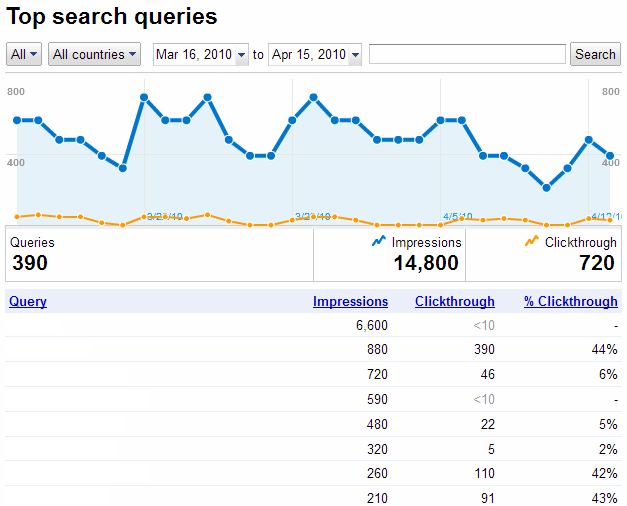
The new look 'top search queries' in Google's Webmaster Tools seems fresh off the press and it's a treat.

It not only gives you the previous information of how many times your site generated impressions and clicks in Google SERPs, it also gives you a good dissection of these details.

Before when you thought, well my site has generated 6,600 impressions (please see above), you'd have believed at least a few of these would have generated a click - but no. For some keywords it's pretty painful, but for others an impressive 44% (also see above).

That's naturally not all, you now get to see where a particular keyword is ranking in SERPs, and this is the surprising bit, because in the previous layout you got the information that someone had clicked through to your site and you wondered how, because you weren't on the 1st page of Google; now you find out that people do actually find you on the 3rd page of Google and click through to your site.

The graph is also a boon, even if I originally thought I'd mistakenly logged in to Analytics.

The countries option and date option will help when you want to test any campaigns or try out some new keywords on the site. Once more the job of SEO is becoming more transparent, nothing to hide behind; that is of course of you show your clients the report!

Monday, 1 February 2010

Google Labs - Site Performance


You probably have tracking measures set-up for your website to let you know if it ever goes down. How accurate are these and do they give you information about when your website is running slowly - probably not.

In Google Webmaster there's a little tool that's been in operation for a short while now, it's under 'labs' and it's called 'site performance'. It's basically a nifty bit of kit which lets you see visually (see above) how your site has been performing. It also tells you how your site is performing compared to other sites on the web - that is, is it faster or slower.

I've been complaining for quite some time about the speed of websites, basically I find too many sites too slow, this is usually down to adding too many apis, or poor consolidating of JavaScript and CSS script.

Google bringing in their 'page speed' is a blessing and hopefully it'll shake up the developers who persist in trying to bring web users machines to a staggering halts.

By using the site performance gadget in Webmaster Tools you'll have more ammunition to throw at your web developers when they tell you, you are wrong and that your website runs just fine - be that on their system!

Tuesday, 1 December 2009

Fetch as Googlebot - Not Just a Gimmick

When I first seen the 'labs' button and 'Fetch as Googlebot' in Webmaster tools, I thought to myself what good is this? I can render pages in SERPs if I need to see if they're working or not - or can I?

By entering the page you want to check and clicking 'Fetch', if your page is available on the net Google will return a green tick and 'success'.

fetch as googlebot


But that's not all - there may be something hidden.

By clicking on the 'success', you get a full blown view of exactly what the Googlebot sees when he visits your page.

fetch as googlebot code


Not very interesting if there's nothing to hide, but if something somehow got into your code, which you didn't intentionally put there, well, it could just save you, not only a headache, but also a little time in Google jail.

Wednesday, 7 October 2009

Verisfied & Not Verified in Google Webmaster Tools

Since Google changed its Webmaster Tools interface and all its internal workings I haven't been able to change my preferred domain settings.

That's till today, when I eventually got around to solving the conundrum.

You see previously in Webmaster Tools, once you'd verified your site, that was it, you could go into your settings and chose the domain you prefer: i.e. with the 'www' or without - it's all to do with canonicalisation; meaning you only want Google to index one of your domains and the usual choice is with the 'www'.

Not so of late, because once you chose a different domain preference Webmaster Tools informs you that you first need to verify your site...

Fortunately I've found a solution. To change to your preferred domain within the settings interface, all you need to do is add both of your domains to Webmaster Tools, i.e.:

mywebsite.com
&
www.mywebsite.com

That's it problem solved, go back to settings and make your choice.